
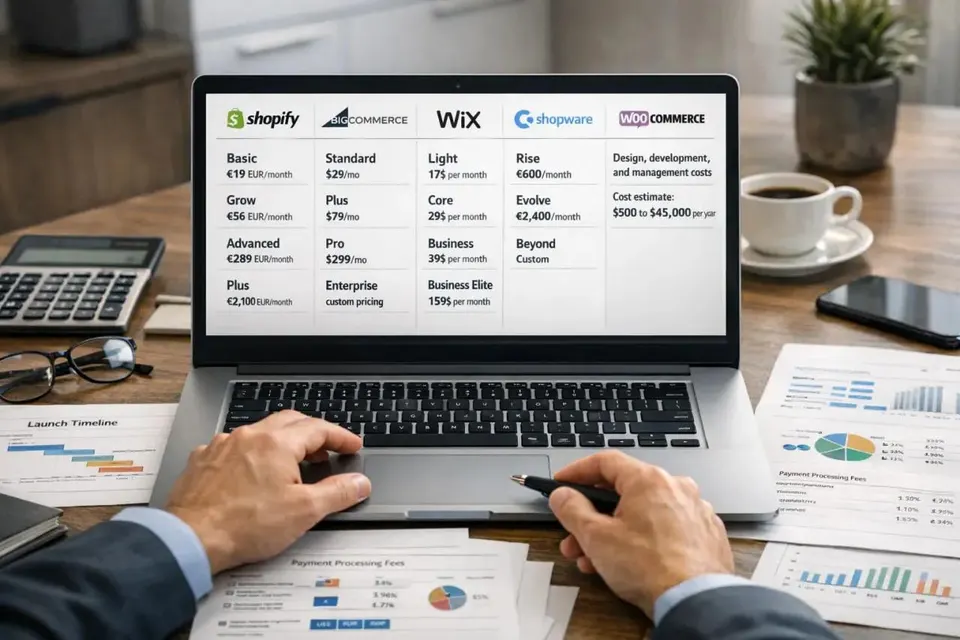
Choosing an ecommerce platform is one of the most important decisions when starting or growing an online business. In the WooCommerce vs Shopify comparison, Shopify is usually the better choice for businesses that want a simple, managed ecommerce solution. WooCommerce is often better for businesses that need greater customization, control over their website, and flexibility with WordPress.
However, the best platform is not necessarily the cheapest or easiest to launch. You should consider the total cost of ownership, payment options, SEO, performance, integrations, and long-term business requirements.
In this guide, we compare WooCommerce and Shopify in 2026 to help you decide which platform is right for your online store.
Woocommerce vs Shopify Table
WooCommerce and Shopify can both support successful ecommerce businesses. The main difference is how much control and technical responsibility you want.
Comparison | WooCommerce | Shopify |
|---|---|---|
Platform type | Open-source WordPress plugin | Hosted ecommerce platform |
Starting platform cost | Free core plugin | Monthly subscription |
Hosting | You choose and manage it | Included |
Ease of use | Requires some WordPress knowledge | Beginner-friendly |
Customization | Extensive code and design control | Themes, apps, and platform APIs |
SEO flexibility | Extensive WordPress SEO options | Built-in SEO tools and settings |
Maintenance | Your responsibility or your developer's | Much of the infrastructure is managed |
Payment options | Multiple gateway choices | Supported gateways and Shopify Payments where available |
App ecosystem | WordPress plugins and WooCommerce extensions | Shopify App Store |
Best for | Custom stores and WordPress businesses | Businesses wanting managed ecommerce |
Our quick recommendation:
Choose Shopify if you want to launch quickly and spend less time managing hosting, updates, and infrastructure.
Choose WooCommerce if you want control over your website, custom functionality, content, and hosting environment.
Choose neither based only on the initial subscription price. Calculate the full cost of running your store.
Cost: Setup and Monthly
Cost is one of the first things business owners compare when deciding between WooCommerce and Shopify.
However, the free WooCommerce plugin does not mean a complete online store costs nothing. You still need hosting, a domain, a design, payment processing, security, and potentially paid extensions.
Shopify uses a subscription model. Its hosting and core ecommerce infrastructure are included in the plan.
WooCommerce costs
WooCommerce is a free, open-source ecommerce plugin for WordPress.
Your main expenses may include:
Domain registration
WordPress hosting
Website design and development
Premium themes, if required
Paid plugins and extensions
Payment processing fees
Security and backup services
Ongoing maintenance
WooCommerce's official pricing information gives a hosting estimate of approximately $25–$350 per month for most stores, depending on requirements. Extensions may cost approximately $29–$299 per year each. Actual costs vary by provider, store complexity, and location.
The advantage is that you decide where to spend your budget. You can start with essential features and add more functionality when your business needs it.
Shopify costs
Shopify charges a monthly subscription for access to its ecommerce platform.
Its US pricing page currently lists these example prices:
Basic: $29 per month when billed annually
Grow: $79 per month when billed annually
Advanced: $299 per month when billed annually
Plus: Starting from $2,300 per month
Prices and available features vary by country, billing arrangement, and plan. Monthly billing can also cost more than annual billing.
You may also pay for:
Premium themes
Paid applications
Payment processing
Additional services
Custom development
Third-party transaction fees when using an external payment provider, depending on your plan and location
Which platform is cheaper?
There is no universal answer.
WooCommerce can be cost-effective when you already have WordPress hosting, can manage the website yourself, and only need a few extensions.
Shopify can be more predictable because hosting and much of the core infrastructure are included. It may also reduce the amount of technical maintenance required from your team.
For a fair comparison, calculate the cost of:
Initial design and development
Monthly platform and hosting expenses
Paid themes and extensions
Payment processing
Maintenance and technical support
Marketing and business integrations
Our advice: Compare the total cost of operating your store over 12 months, not just the price of the platform.
Ownership and Flexibility
Ownership is one of the biggest differences between WooCommerce and Shopify.
WooCommerce: More control over your store
WooCommerce runs on WordPress and gives you access to your website's files, database, hosting environment, and code.
You can choose your hosting provider, modify your theme, develop custom plugins, and build integrations around your business requirements.
This is useful if you want:
A completely customized storefront
Special product pricing rules
Custom checkout workflows
Complex shipping calculations
Business-specific integrations
Advanced membership or subscription features
A website combining ecommerce and content marketing
You also have more responsibility. You or your technical team must manage updates, backups, security, hosting, and compatibility between plugins.
Shopify: Managed ecommerce infrastructure
Shopify is a hosted platform. You manage your products, orders, themes, customers, and store settings through its administration interface.
Shopify handles much of the infrastructure, including hosting and platform maintenance.
This means you do not need to manage a separate web server or WordPress installation.
However, you work within Shopify's platform rules and customization options. Some changes may require an application, custom development, or a higher-tier plan.
You do not have the same direct access to the underlying server and platform code that you have with a self-hosted WooCommerce store.
Which offers better ownership?
If you want greater technical control and freedom to customize your ecommerce system, WooCommerce is usually the stronger option.
If you prefer a managed platform and are comfortable working within its ecosystem, Shopify is often more convenient.
Neither approach is automatically better. The right choice depends on how much control your business actually needs.
SEO and Page Speed
Search visibility can have a major impact on ecommerce sales. Customers need to find your products through Google and other search platforms.
Both WooCommerce and Shopify can support ecommerce SEO. Neither platform guarantees higher rankings.
Your results depend on content quality, technical setup, website performance, product information, internal links, and competition.
WooCommerce SEO
WooCommerce benefits from the wider WordPress ecosystem.
You can use SEO plugins and customize many aspects of your website, including:
Page titles and meta descriptions
Product descriptions
Category content
URL structures
Internal linking
Schema markup
XML sitemaps
Blog content
Redirects
This flexibility is particularly useful for businesses that rely on content marketing and organic search.
For example, a store selling outdoor equipment could publish buying guides, product comparisons, maintenance advice, and category-specific articles alongside its products.
However, having many SEO options does not guarantee good results. Poor plugin choices, duplicate content, weak navigation, and technical problems can affect performance.
Shopify SEO
Shopify provides built-in SEO features that make it easier to manage important store settings.
You can edit page titles, meta descriptions, product information, image alt text, and URL redirects.
It also supports ecommerce features such as product organization and structured data through themes and applications.
Shopify is convenient for store owners who want standard SEO functionality without managing a large collection of WordPress plugins.
However, certain URL structures and platform limitations may require extra planning when building a highly customized SEO strategy.
Which is better for SEO?
WooCommerce offers greater technical flexibility, especially for businesses that want extensive control over content and website structure.
Shopify offers a simpler starting point for standard ecommerce SEO.
In either case, focus on:
Unique product descriptions
Useful category pages
Search-friendly URLs
Mobile usability
Fast-loading product images
Internal links
Structured product information
Relevant blog content
Page speed also matters. Google recommends good Core Web Vitals, including a Largest Contentful Paint of 2.5 seconds or less, Interaction to Next Paint below 200 milliseconds, and Cumulative Layout Shift below 0.1.
WooCommerce performance depends heavily on hosting, themes, plugins, caching, image optimization, and database management. Shopify manages more of the underlying infrastructure, but theme choices, apps, and large media files can still affect storefront performance.
The verdict: WooCommerce gives developers more performance control. Shopify reduces infrastructure management. A properly optimized store on either platform can provide a good customer experience.
Payments, Shipping and Apps
Your ecommerce platform must support how your customers pay and how your products reach them.
Before choosing a platform, check whether the payment gateways, shipping providers, and business applications you need are supported in your target markets.
Payment gateways
WooCommerce supports a wide range of payment integrations. You can select a payment provider based on your country, business model, and customer preferences.
Depending on the gateway, you may support:
Credit and debit cards
Bank transfers
Digital wallets
Cash on delivery
Local payment methods
International payments
Shopify also supports multiple payment providers. Shopify Payments is available only in supported countries and regions. If you use an external provider, additional Shopify transaction fees may apply depending on your plan and location.
This is particularly important for businesses selling internationally or operating in markets where local payment gateways are essential.
Shipping options
Both platforms can support shipping integrations.
WooCommerce allows developers to configure shipping zones, methods, classes, and custom rules. Additional plugins can connect the store to shipping companies and fulfilment services.
Shopify offers built-in shipping features and integrations with supported providers. Some advanced shipping capabilities depend on the plan, region, or application.
Consider these requirements before choosing:
Local and international shipping
Multiple shipping rates
Weight-based pricing
Free shipping thresholds
Real-time shipping rates
Order tracking
Warehouse or fulfilment integrations
Apps and extensions
WooCommerce uses WordPress plugins and WooCommerce extensions to add functionality.
Shopify uses applications from the Shopify App Store.
You can find tools for:
Email marketing
Inventory management
Customer reviews
Subscriptions
Analytics
Shipping
Accounting
Customer support
Marketing automation
However, installing too many applications or plugins can increase costs and create maintenance challenges.
For WooCommerce, plugin compatibility and performance need regular attention. For Shopify, application subscriptions and platform limitations should be considered.
Our recommendation: Check payment and shipping availability before selecting a platform. A beautiful store is not useful if customers cannot pay conveniently or receive their orders reliably.
Scaling: What Happens at 1,000+ Orders a Month?
A platform that works for your first 50 orders should also support your business as sales increase.
But does WooCommerce or Shopify perform better when your store reaches 1,000 or more monthly orders?
Both can support growing businesses. The difference is how scaling is managed.
Scaling WooCommerce
WooCommerce can handle substantial ecommerce workloads when the hosting environment, database, code, and plugins are properly optimized.
As your store grows, you may need to invest in:
Better hosting infrastructure
Database optimization
Caching
Content delivery networks
Image optimization
Background processing
Monitoring and backups
Performance testing
High-Performance Order Storage (HPOS) is also worth considering. It uses dedicated database tables designed for WooCommerce order data.
The important point is that WooCommerce performance depends on the entire technical setup, not just the ecommerce plugin.
A poorly configured store with too many inefficient plugins may struggle even with relatively modest traffic.
Scaling Shopify
Shopify manages much of the underlying infrastructure, so you do not need to configure your own web server as sales increase.
This can make operational scaling easier.
You can focus on:
Product management
Marketing
Customer service
Order fulfilment
Inventory
Sales analytics
However, growing businesses may need more advanced plans, paid applications, custom integrations, or specialized development.
Payment fees and app subscriptions can also become significant as sales increase.
Is 1,000 orders a month too much for either platform?
No. Monthly order count alone does not determine whether a platform can handle your business.
Consider these factors:
How many visitors arrive at the same time?
How many products and variations do you sell?
How complex is your checkout?
Do you run flash sales?
How many integrations process orders?
How quickly must inventory update?
Do you need multiple warehouses or locations?
A store receiving 1,000 orders evenly throughout a month has different technical demands from a store receiving thousands of visitors during a short promotional campaign.
The verdict: Shopify offers a more managed route to scaling. WooCommerce offers more control over infrastructure and customization, but requires a capable technical setup.
Migrating Between Them
Your ecommerce platform should support your business today and give you a practical path forward if your needs change.
Moving from WooCommerce to Shopify—or Shopify to WooCommerce—is possible. However, migration is more than copying product names and prices.
Moving from WooCommerce to Shopify
You may need to migrate:
Products and product images
Product variations
Customer information
Historical orders
Reviews
Blog posts
Website pages
Coupons
SEO information
Shopify provides migration options, including CSV imports and its Store Migration app for eligible product and customer data.
However, not all information transfers automatically. For example, customer passwords, historical orders, reviews, and some WordPress content require additional steps or third-party tools.
You should also review URL changes and prepare redirects to protect existing links and search traffic.
Moving from Shopify to WooCommerce
Moving in the opposite direction also requires planning.
You may need to transfer:
Product information
Customer data
Orders
Product images
Collections and categories
Reviews
Pages and blog content
SEO titles and descriptions
Redirect rules
The new WooCommerce website also needs hosting, payment gateway configuration, shipping settings, security, and performance optimization.
How to reduce migration problems
Follow a structured migration process:
Back up the existing store.
Audit products, customers, orders, and content.
Identify data that needs special handling.
Export and map the required information.
Import the data into a staging environment.
Rebuild important pages and functionality.
Map old URLs to their new destinations.
Test payments, shipping, and checkout.
Check product information and customer records.
Launch and monitor the new store.
Do not close your old store immediately. Keep it available until you have verified that the new store works correctly.
If your website receives organic traffic, preserving important URLs and redirects should be a priority.
Our Recommendation by Business Type
So, which platform should you choose in 2026?
The answer depends on your products, business model, budget, and technical requirements.
Choose WooCommerce if:
You already use WordPress.
You want full control over your website.
You need custom ecommerce functionality.
Content marketing and blogging are important.
You want to choose your own hosting provider.
You need custom integrations with business systems.
You have access to technical support or development resources.
WooCommerce is particularly suitable for businesses that want their online store to be part of a larger WordPress website.
Choose Shopify if:
You want to launch quickly.
You prefer a managed ecommerce platform.
You do not want to manage hosting and server updates.
Your business uses standard ecommerce workflows.
You want a straightforward administration experience.
You prefer adding features through a managed application ecosystem.
Shopify is a strong option for entrepreneurs who want to spend more time managing products, customers, and marketing rather than website infrastructure.
What about growing or established businesses?
A larger business should not choose a platform based only on its current size.
Instead, evaluate:
Custom pricing and product rules
Inventory and warehouse systems
Multiple sales channels
ERP and accounting integrations
Customer relationship management
International payments
Reporting requirements
Custom checkout needs
Performance and operational support
A well-built WooCommerce store may be a better fit for a business with complex custom workflows. Shopify may be more convenient for a business that values managed infrastructure and standard ecommerce operations.
Final verdict: WooCommerce vs Shopify 2026
Our overall recommendation is simple:
Choose Shopify for convenience. Choose WooCommerce for flexibility and control.
If you are launching a small store with standard requirements and want to avoid managing technical infrastructure, Shopify is an excellent starting point.
If you want a highly customized website, deeper WordPress integration, and more control over how your ecommerce business operates, WooCommerce is often the better fit.
There is no universal winner. The best ecommerce platform is the one that supports your customers, business processes, and future plans without creating unnecessary complexity.
How Algo Matryx Can Help With Your Ecommerce Website
Choosing a platform is only the beginning. Your online store also needs a professional design, a smooth shopping experience, secure payments, reliable performance, and the right integrations.
Algo Matryx helps businesses plan, build, improve, and maintain ecommerce websites.
Our ecommerce development services can include:
WooCommerce development: Custom WordPress ecommerce websites, themes, and functionality.
Shopify development: Store setup, theme customization, and ecommerce improvements.
Custom ecommerce development: Tailored shopping experiences and business-specific workflows.
Payment integration: Connecting suitable payment gateways for your target market.
Shipping integration: Setting up shipping rules and relevant delivery services.
Performance optimization: Improving website speed and the customer experience.
SEO setup: Improving technical SEO, product pages, and website structure.
Custom integrations: Connecting ecommerce systems with CRM, inventory, accounting, and other business tools.
Ongoing maintenance: Troubleshooting, security improvements, updates, and technical support.
Our goal is to build an online store that works for your business—not simply install a theme and add products.
Explore our Ecommerce Development Services or contact Algo Matryx to discuss your project.
Frequently Asked Questions
1. Is WooCommerce better than Shopify in 2026?
WooCommerce is better for businesses that need customization, WordPress integration, and control over hosting. Shopify is better for businesses that want a managed ecommerce platform and simpler maintenance.
2. Is WooCommerce cheaper than Shopify?
WooCommerce has no core platform subscription, but hosting, extensions, development, and maintenance cost money. Shopify has a monthly subscription that includes hosting. The cheaper option depends on your store's requirements and total operating costs.
3. Which is better for a small business?
Both are suitable for small businesses. Shopify is often easier for beginners, while WooCommerce is a good choice if you already use WordPress or need more customization.
4. Which platform is better for SEO?
Both platforms support ecommerce SEO. WooCommerce offers extensive customization through WordPress, while Shopify provides convenient built-in SEO features. Content quality, technical optimization, and website performance matter more than the platform alone.
5. Can WooCommerce handle 1,000 orders per month?
Yes. WooCommerce can handle this volume with suitable hosting, optimized code, database management, and a reliable checkout setup. Actual performance depends on traffic patterns and store complexity.
6. Can Shopify handle a large ecommerce store?
Yes. Shopify supports businesses at different stages of growth. Larger stores may need advanced plans, applications, or custom integrations depending on their requirements.
7. Can I move from WooCommerce to Shopify?
Yes. Products and customer information can be migrated using CSV files, migration applications, or specialist services. Other information, including historical orders, reviews, and WordPress content, may require additional migration work.
8. Can I move from Shopify to WooCommerce?
Yes. Products, customers, orders, and other store information can be transferred using suitable export and migration tools. You will also need to configure hosting, payments, shipping, security, and redirects.
9. Do I need a developer to build a WooCommerce or Shopify store?
You can build a basic store yourself using themes and built-in tools. However, a developer can help with custom design, integrations, performance, security, advanced checkout requirements, and migration.
Ready to build or improve your online store?
The right ecommerce platform should make selling easier today and support your business as it grows.
Visit Algo Matryx Ecommerce Development or contact our team to discuss your WooCommerce or Shopify project.